
Access Request System
Access Request System
Approval gates the server's delivery of encrypted content. Successors are already cryptographic recipients so delayed access can work without the Custodian being available. A Successor with an independently obtained ciphertext copy can decrypt it offline before approval. Unlocking a personal identity is still required in the application, and newly enrolled recipients may need the asset re-encrypted before decryption works. See the Security Model.
The Access Request System is how Successors gain permission to view the encrypted secrets stored in assets. This system implements multiple approval methods to balance security with accessibility during disaster recovery scenarios.
Overview
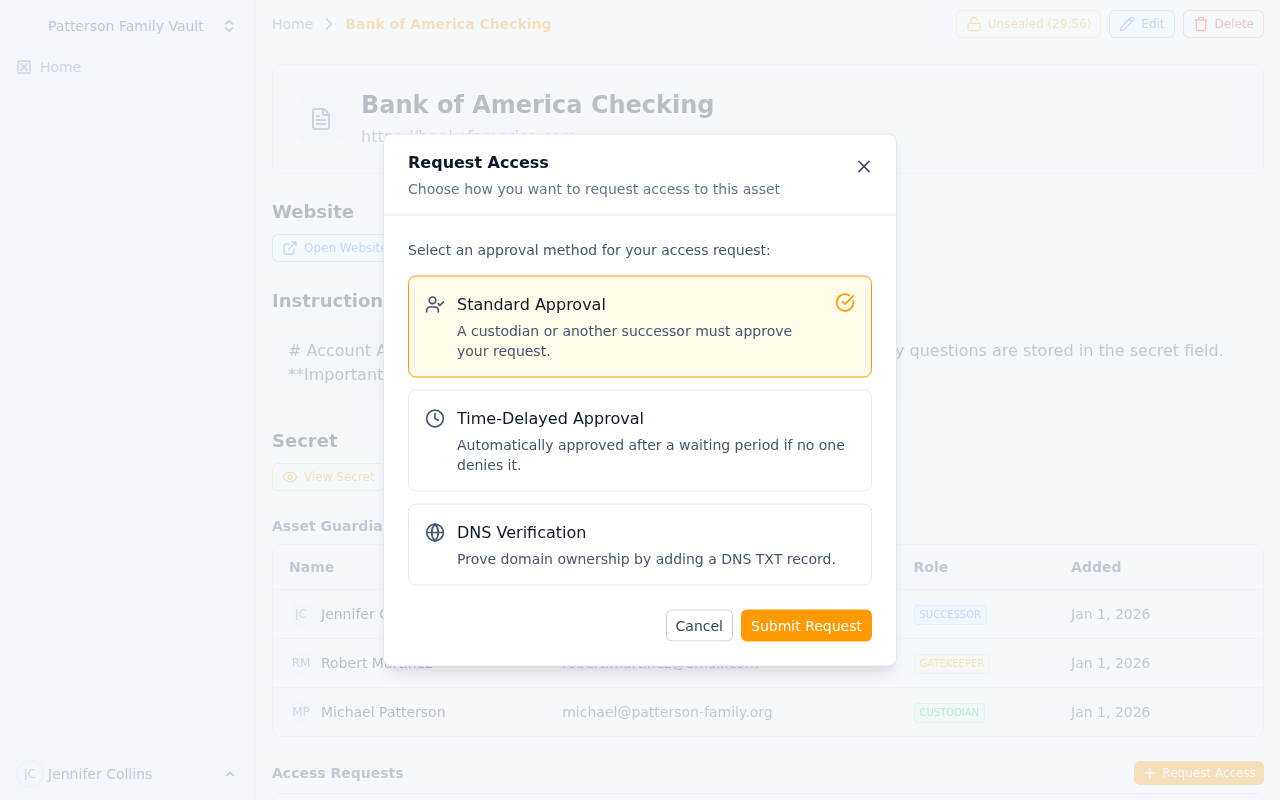 Submitting an access request with approval method selection
As a Successor on an asset, you cannot view the encrypted secret by default. When you need access (typically during an emergency), you must create an access request that gets approved through one of three methods:
- Standard Approval - Another guardian manually approves your request
- Time-Delay - Auto-approved after a waiting period if no one denies it
- DNS Verification - Auto-approved by proving you control the domain
Each method serves different security and urgency needs.
When to Request Access
Access requests should only be made during legitimate scenarios, such as:
- Emergency Access: The Custodian is unavailable and you need credentials immediately
- Disaster Recovery: A critical system is down and you need access to restore it
- Business Continuity: The Custodian has left the organization and you need to take over
- Scheduled Transition: Planned handoff of responsibilities
- Security Incident: Need to change compromised credentials
Always communicate with your team when requesting access, especially for high-security assets.
Access Request Methods
Method 1: Standard Approval
Best For: Most scenarios where manual approval is appropriate
How It Works:
- You submit an access request
- The Custodian and other Successors receive email notifications
- Any Custodian or Successor (who has already been approved) can approve your request
- Once approved, you can view the encrypted secret
- If denied, you must wait and can submit a new request later
Timeline: Depends on how quickly another guardian responds (no automatic timeout)
Who Can Approve:
- The Custodian (always)
- Any Successor who has previously received approved access
Who Can Deny:
- The Custodian
- Any Gatekeeper
- Any Successor
Creating a Standard Approval Request:
- Navigate to the asset page
- Click "Request Access" button
- Select "Standard Approval"
- Optionally add a reason or explanation
- Click "Submit Request"
Best Practices:
- Include a clear reason for your request
- Contact guardians via other channels (phone, Slack) to expedite approval
- Explain the urgency if it's time-sensitive
Method 2: Time-Delay
Best For: Situations where you need guaranteed access within a specific timeframe, but want guardians to have veto power
How It Works:
- You submit a time-delay access request
- A countdown timer starts (1 or 2 hours depending on business hours setting)
- All guardians are notified immediately via email
- During the delay period, any guardian can deny your request
- If no one denies it before the timer expires, your request is auto-approved
- Once approved, you can view the encrypted secret
Timeline Options:
Non-Business Hours Mode (default):
- Simple 2-hour delay from submission time
- Works 24/7, including weekends
- Best for global teams or critical systems
Business Hours Mode:
- 1-hour delay, but only counted during business hours (9 AM - 5 PM UTC, Monday-Friday)
- If submitted outside business hours, timer starts at 9 AM the next business day
- If timer would expire after 5 PM, remaining time carries over to next business day
- Best for organizations with standard work schedules
Who Can Deny:
- The Custodian
- Any Gatekeeper
- Any Successor
Creating a Time-Delay Request:
- Navigate to the asset page
- Click "Request Access" button
- Select "Time-Delayed Approval"
- Choose whether to use business hours only (checkbox)
- Optionally add a reason or explanation
- Click "Submit Request"
- Monitor the countdown timer on the asset page
Best Practices:
- Use time-delay for predictable emergencies where you need assured access
- Choose business hours mode if your team only monitors during work hours
- Still communicate with your team - don't rely solely on the timer
- Monitor your request status in case someone denies it
Important Notes:
- You can only have one pending access request per asset at a time
- If denied, you must wait and submit a new request
- Auto-approval triggers send notifications to all guardians
- Access granted via time-delay lasts until revoked; you still unlock your own personal identity to decrypt
Method 3: DNS Verification
Best For: High-security assets tied to a specific domain (like domain registrar credentials or SSL certificates)
How It Works:
- You submit a DNS verification access request
- The system extracts the domain from the asset's website field
- You receive a unique TXT record value to add to your DNS zone
- You add the TXT record to your domain's DNS settings
- You click "Verify DNS" to check the record
- If the record is found, your request is auto-approved immediately
- Once approved, you can view the encrypted secret
Requirements:
- The asset must have a website URL configured
- You must have access to the domain's DNS settings
- The domain must be publicly resolvable
DNS Record Details:
- Record Type: TXT
- Record Name:
_keymanout-access-verification(or@if your DNS provider requires) - Record Value: A unique token provided in the access request (e.g.,
keymanout-access-token-abc123xyz) - TTL: Any value (3600 recommended)
Creating a DNS Verification Request:
- Navigate to the asset page
- Click "Request Access" button
- Select "DNS Verification"
- Click "Submit Request"
- Copy the provided TXT record details
- Add the TXT record to your domain's DNS zone
- Wait for DNS propagation (can take 1-60 minutes)
- Click "Verify DNS" button
- If successful, access is granted immediately
Best Practices:
- Only use for assets tied to domains you control
- Document DNS access in your asset instructions
- Test DNS verification ahead of time if possible
- Remember DNS changes can take time to propagate
- Remove the TXT record after verification (optional, for security)
Troubleshooting DNS Verification:
If verification fails:
- Wait longer: DNS propagation can take 5-60 minutes
- Check record name: Some providers need
_keymanout-access-verification.yourdomain.com, others need just_keymanout-access-verification - Verify TXT value: Copy-paste the exact token provided (case-sensitive)
- Use DNS tools: Check your TXT record with
digor online DNS lookup tools - Check domain: Ensure the asset's website field has the correct domain
Example DNS Configuration:
For domain example.com:
Record Type: TXT
Name: _keymanout-access-verification
Value: keymanout-access-token-abc123xyz
TTL: 3600
Verification query: dig TXT _keymanout-access-verification.example.com
Request Lifecycle and Status
Status: Pending
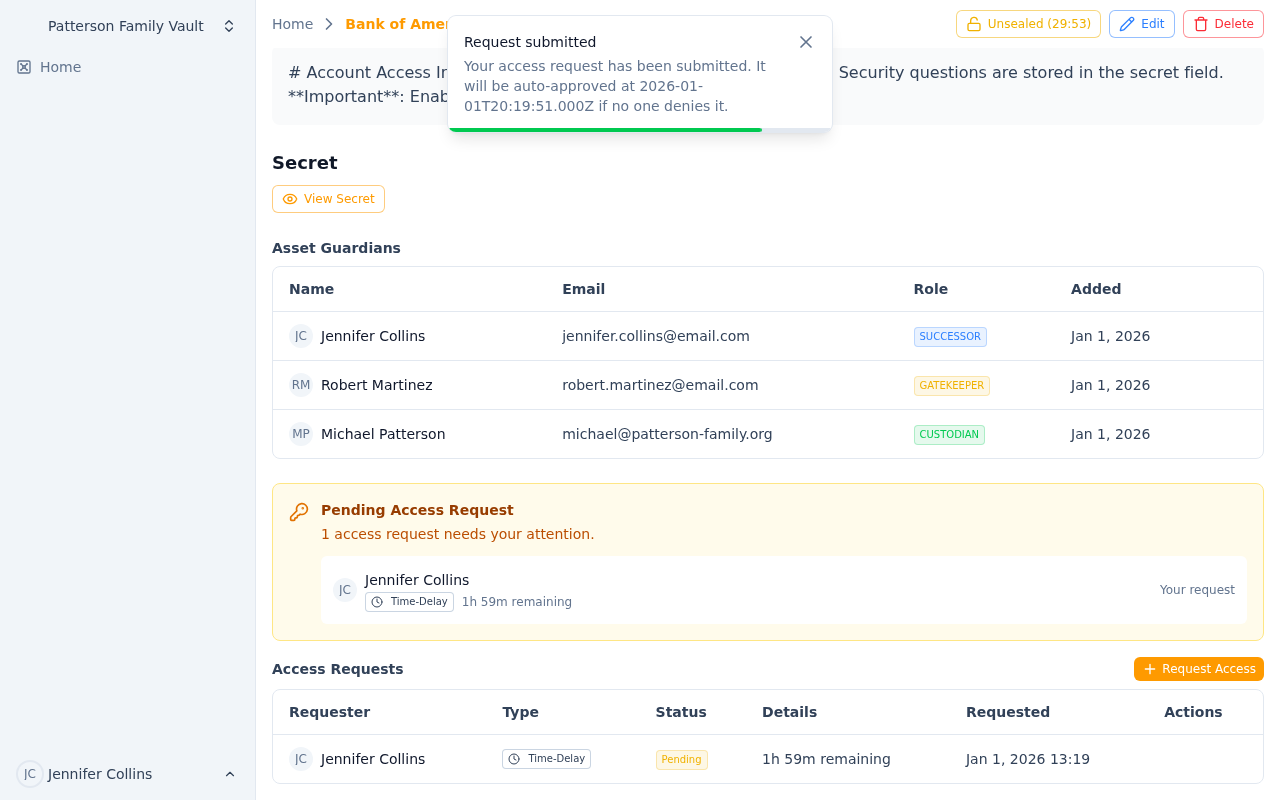 A pending time-delay request showing the countdown timer
- Request has been submitted and is awaiting resolution
- For standard approval: waiting for someone to approve or deny
- For time-delay: countdown timer is active, can still be denied
- For DNS verification: waiting for you to add the TXT record and verify
Actions Available:
- View request details
- For time-delay: monitor countdown timer
- For DNS verification: verify DNS record
- Cancel request (not yet implemented - contact Custodian to deny)
Status: Approved
- A Custodian or Successor manually approved your request
- You now have permanent access to view the encrypted secret
- Access remains until the Custodian revokes it or you're removed as a Successor
- Custodian receives notification when you view the secret
Actions Available:
- View the encrypted secret content
- Download attached files
Status: Auto-Approved
- Time-delay request expired without denial, OR
- DNS verification succeeded
- Functionally identical to "Approved" status
- You now have permanent access to view the encrypted secret
Actions Available:
- View the encrypted secret content
- Download attached files
Status: Denied
- A guardian explicitly denied your request
- You cannot view the encrypted secret
- The request includes a denial reason (if provided)
- You can submit a new request after communicating with your team
Actions Available:
- Submit a new access request
- Contact guardians to understand why it was denied
Status: Expired
- (Currently unused - requests don't auto-expire)
- Reserved for future feature where requests may expire after a certain period
Viewing and Managing Your Requests
View All Your Requests
To see all your access requests across all assets:
- Navigate to your dashboard
- Look for "My Access Requests" section (or check your email notifications)
- Filter by status: Pending, Approved, Denied
View Asset-Specific Requests
To see all requests for a specific asset (if you're a Custodian or Successor):
- Navigate to the asset page
- Scroll to "Access Requests" section
- See all pending and historical requests
- Approve or deny requests if you have permission
Approving and Denying Requests
If You're a Custodian or Successor
When someone requests access to an asset where you're a guardian:
- You receive an email notification with request details
- Navigate to the asset page
- Review the request in the "Access Requests" section
- Click "Approve" or "Deny"
- Optionally provide a reason for your decision
- Submit your decision
Approval Considerations:
- Is the requester's reason legitimate?
- Have you communicated with the requester?
- Is this an expected disaster recovery scenario?
- Do company policies allow this access?
Denial Considerations:
- Does the request seem suspicious or unauthorized?
- Is there a better alternative (e.g., contacting the Custodian)?
- Should you communicate with the requester first?
If You're a Gatekeeper
Gatekeepers can only deny time-delay requests (not approve or deny standard requests):
- You receive an email notification about a time-delay request
- Navigate to the asset page
- Review the request and countdown timer
- If it seems unauthorized, click "Deny"
- Provide a reason for the denial
- Submit your decision
Your role is to provide security oversight - deny requests that seem suspicious, but don't block legitimate emergencies.
Email Notifications
For Requesters
- Request Created: Confirmation that your request was submitted
- Request Approved: Someone approved your request manually
- Request Auto-Approved: Time-delay expired or DNS verified
- Request Denied: Someone denied your request (includes reason)
For Custodians
- Request Created: A Successor submitted an access request
- Request Approved: Another guardian approved a request
- Request Auto-Approved: A time-delay request auto-approved
- Request Denied: Someone denied a request
- Secret Accessed: The requester viewed the encrypted secret
For Gatekeepers and Successors
- Request Created: A Successor submitted an access request (for time-delay, gives you opportunity to deny)
- Request Approved: A request was approved (for awareness)
- Request Auto-Approved: A time-delay request auto-approved
- Request Denied: A request was denied
Security Considerations
Access Request Logging
All access requests are logged with:
- Requester identity
- Timestamp
- IP address
- Geographic location (if available)
- Request type and parameters
- Resolution (approved/denied/auto-approved)
- Who resolved it
Secret Access Logging
When you view an encrypted secret after approval:
- Custodian receives an email notification
- Access is logged with timestamp, IP, and location
- Multiple accesses by the same person are all logged
Approved Access Duration
Once approved (by any method), your access is permanent until:
- The Custodian removes you as a Successor
- A Successor removal request is approved
- The asset is deleted
Approved Successors do not need repeated approval, but must unlock their personal identity to decrypt. Membership and guardian checks still apply to each payload read.
Best Practices
For Successors
- Only Request When Truly Needed: Don't request access "just in case"
- Communicate First: Contact the Custodian or team before requesting
- Provide Context: Include a clear reason in your request
- Choose the Right Method: Standard for most cases, time-delay for predictable emergencies, DNS for domain-related assets
- Follow Up: If denied, understand why before requesting again
For Custodians
- Respond Quickly: Don't leave Successors waiting during emergencies
- Set Expectations: Document when access requests are appropriate
- Review Carefully: Balance security with team needs
- Monitor Access: Pay attention to secret access notifications
- Revoke When Needed: Remove Successors who no longer need access
For Gatekeepers
- Stay Alert: Monitor time-delay request notifications
- Ask Questions: Reach out to requesters if something seems off
- Don't Over-Block: Remember you're a safety net, not a barrier to legitimate access
- Respond Quickly: Time-delay windows are short (1-2 hours)
Troubleshooting
I submitted a request but no one is responding
- Check if you used the right approval method (time-delay guarantees response)
- Contact guardians via other channels (phone, email, Slack)
- Verify guardians are still active team members
- Consider using time-delay method for guaranteed access
My time-delay request was denied, but I need access
- Communicate with the person who denied it to understand why
- Provide more context about your need for access
- Escalate to team leadership if necessary
- Consider whether DNS verification is appropriate
DNS verification keeps failing
- Wait longer (DNS can take 5-60 minutes to propagate)
- Verify you added the TXT record to the correct domain
- Check the record name format with your DNS provider
- Use a DNS lookup tool to verify the record is visible
- Ensure the asset's website field has the correct domain
I was approved but can't see the secret
- Unlock your personal identity. If your identity is not included in the stored ciphertext, ask an eligible recipient to re-encrypt the asset.
- Check that you're logged in as the correct user
- Verify you're looking at the right asset
- Try refreshing the page
Someone accessed my asset's secret but I didn't approve it
- Check if they have auto-approved status from a previous time-delay or DNS request
- Review the access log in the email notification for details
- If unauthorized, remove the person as a Successor
- Contact support if you suspect a security issue
Related Documentation
- Guardian System - Understanding roles and permissions
- Security Model - How encryption and access control works
Guardian System
Understand Key Man Out's three-tier guardian system with Custodians, Gatekeepers, and Successors. Learn how to manage asset-level permissions and access control.
Security Model
Personal age identities, encrypted secrets, guardian access, owner escrow, and the limits of browser-side encryption.