
Intelligent Access Control
Intelligent Access Control
Access approval is a server-side gate on ciphertext delivery. Asset contents are encrypted in advance to the Custodian and enrolled Successors, plus optional owner escrow. A recipient with an independently obtained ciphertext copy can decrypt it offline; approval does not cryptographically withhold that copy. Gatekeepers are not recipients through their guardian role. See the Security Model for the exact policy.
Access When Needed, Protected Always
Not all secrets require the same level of protection. A development API key needs different safeguards than production database credentials. Key Man Out's intelligent access control lets you match security measures to sensitivity—without creating operational bottlenecks.
Three Approval Methods for Every Security Need
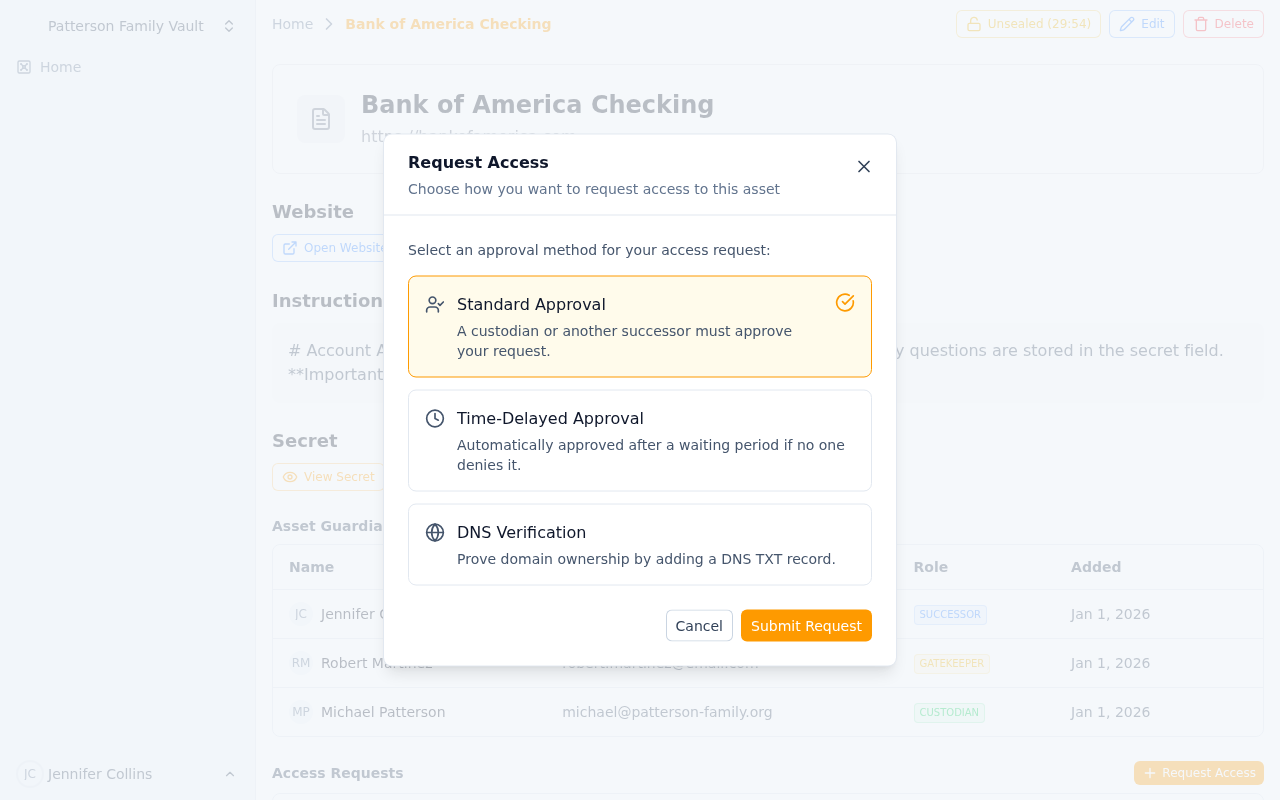 Choose between Standard Approval, Time-Delay, or DNS Verification based on security needs
Standard Approval: Fast but Verified
Best For: Moderate-sensitivity assets requiring quick access with oversight.
How It Works:
- Successor requests access to asset
- Custodian and/or gatekeepers receive immediate notification
- Any designated approver can approve or deny
- Upon approval, successor gains immediate access
- Access logged and reported to custodian
Typical Use Cases:
- Development environment credentials
- Shared team documentation
- Client account information during business hours
- Backup access to non-critical systems
- Reference materials and templates
Business Benefit: Quick access for legitimate needs while preventing unauthorized silent access.
Example Scenario:
Account manager out sick. Backup manager requests access to client contract. Sales director receives notification on phone, reviews context, approves. Backup gains access immediately to continue client service. Original manager notified upon return.
Time-Delay Approval: Patience as a Security Feature
Best For: High-sensitivity assets where urgency itself is suspicious.
How It Works:
- Successor requests access with justification
- Custodian and gatekeepers notified immediately
- Mandatory waiting period begins (hours to days, configured per-asset)
- Request can be denied during waiting period
- If not denied, access automatically granted after delay expires
- Custodian can override and grant immediate access if needed
Configurable Business Hours Awareness:
- Delay counts business hours only (e.g., 24 business hours = 3 calendar days)
- Configurable business schedule per team (9-5 Mon-Fri, custom hours)
- Weekends and holidays excluded from countdown
- Prevents 5pm Friday requests for Monday access
Typical Use Cases:
- Production database credentials
- Domain registrar master accounts
- Financial system admin access
- SSL certificate private keys
- Estate planning documents
- High-value client contracts
Security Benefit: Time delay allows custodian to become aware and respond even if temporarily unreachable. Legitimate requests proceed, suspicious ones get caught.
Example Scenario:
Attacker compromises successor account, requests access to AWS root credentials. Request triggers 48 business-hour delay. Custodian returns from weekend trip, sees notification, denies request. Attack prevented despite successor account compromise.
Emergency Override: Custodian can grant immediate access when genuine emergency verified:
Production database crash. DBA requests credentials with 24-hour delay. CTO confirms emergency, overrides delay, grants immediate access. System restored, full audit trail maintained.
DNS Verification: Cryptographic Proof of Authority
Best For: Domain-related assets requiring proof of domain ownership.
How It Works:
- Successor requests access to domain asset
- System generates unique verification token
- Successor must add TXT record to domain's DNS
- Key Man Out polls DNS to verify record presence
- Upon successful verification, access granted automatically
- DNS record proves requester controls domain infrastructure
Typical Use Cases:
- Domain registrar credentials
- DNS management accounts
- SSL certificate private keys for specific domains
- Domain transfer authorization codes
- Hosting provider credentials for domains
Security Benefit: Requesting access to example.com credentials? Prove you control example.com DNS first. Social engineering and account compromise mitigated through cryptographic proof.
Example Scenario:
Successor requests access to domain registrar account for
acmecorp.com. System generates tokenkmout-verify-a3f9b2c8. Successor adds TXT record_keymanout.acmecorp.comwith token value. System polls DNS, verifies record, grants access. Successor downloads credentials, manages domain, removes DNS record.
Advanced Protection:
- Prevents domain squatting attacks: Attacker can't claim to need access to domain they don't control
- Verifies actual infrastructure access: Not just organizational role but technical capability
- Time-limited tokens: Verification tokens expire after configurable period
- Audit trail includes DNS query logs: Proof of verification process
Approval Workflows and Chains
Single-Approver Workflow
Standard Configuration: Any designated gatekeeper can approve.
- Fast: First available approver can act
- Flexible: Works across time zones and availability
- Accountable: Approver's identity recorded
Best For: Most business scenarios where trust in individual gatekeepers is established.
Multi-Approver Workflow (Consensus)
High-Security Configuration: Multiple gatekeepers must approve.
- Require 2 of 3 gatekeepers for critical assets
- Require all gatekeepers for ultra-sensitive access
- Prevents single-point compromise of gatekeeper accounts
- Consensus requirement ensures oversight
Best For:
- Financial systems with significant impact
- Production infrastructure with regulatory requirements
- Estate assets with multiple beneficiaries
- Merger/acquisition confidential documents
Example:
Production database credentials require 2 of 3 approvals: CTO, Security Officer, Lead Architect. Even if attacker compromises one gatekeeper account, access denied without second approval.
Custodian + Gatekeeper Hybrid
Custodian final authority combined with gatekeeper oversight.
- Gatekeepers can approve OR deny
- Custodian can override any decision
- Custodian absence doesn't block legitimate access
- Custodian presence ensures ultimate control
Best For: Assets where ownership is clear but delegation is needed.
Intelligent Denial Capabilities
Gatekeeper Denials
Gatekeepers can deny requests with reason:
- Suspicious timing (3am request for business-hours asset)
- Unclear justification (vague or missing request reason)
- Unknown requester (successor account compromised?)
- Duplicate request (why ask again so soon?)
Denial triggers:
- Immediate notification to successor and custodian
- Request marked denied in audit log
- Optional cooldown period before re-request allowed
- Escalation to custodian for review
Custodian Override
Custodian always maintains ultimate authority:
- Approve despite gatekeeper denial when context warrants
- Deny despite gatekeeper approval when red flags appear
- Revoke access mid-session if situation changes
- Modify approval workflow for future requests
Access Duration and Revocation
Time-Limited Access
Configurable access windows:
- One-time access: View once, then access expires
- 24-hour access: Common for emergency situations
- 7-day access: Extended coverage for custodian absence
- Custom duration: Match to specific business need
Automatic expiration:
- Access revoked automatically at end of window
- Successor must request again if still needed
- Each request generates new audit trail
- Prevents permanent access creep
Manual Revocation
Custodian can revoke anytime:
- Emergency resolved sooner than expected
- Successor no longer needs access
- Suspicious activity detected
- Change in business circumstances
Instant revocation:
- Access terminated immediately
- Successor notified of revocation
- Audit log updated with reason
- Can be re-granted if needed
Combining Methods for Layered Security
Progressive Security Tiers
Different assets, different workflows:
| Asset Tier | Method | Approvers | Delay |
|---|---|---|---|
| Tier 1: Low Sensitivity | Standard | 1 gatekeeper | None |
| Tier 2: Moderate | Standard | 2 gatekeepers | None |
| Tier 3: High | Time-Delay | 1 gatekeeper | 24 hours |
| Tier 4: Critical | Time-Delay + Consensus | 2 of 3 gatekeepers | 48 hours |
| Tier 5: Domain-Specific | DNS Verification + Time-Delay | Automatic (DNS) + 1 gatekeeper | 12 hours |
Contextual Workflows
Same asset, different workflows based on context:
Production Database Credentials:
- Business hours request: Standard approval (fast recovery)
- After hours request: Time-delay approval (increased scrutiny)
- Weekend request: Time-delay + multi-approver (highest scrutiny)
Domain Registrar Account:
- Renewal operations: Standard approval
- DNS changes: DNS verification only
- Domain transfer: DNS verification + time-delay + multi-approver
Bottom Line: Match security to sensitivity. Fast access when safe, delayed access when prudent, cryptographic proof when critical. Every request logged, every approval recorded, every custodian informed.
Guardian System
Complete control over who can access what with custodians, gatekeepers, and successors. Learn how Key Man Out's three-tier role hierarchy provides security with business continuity.
Team Collaboration
Organize continuity work in teams while each member keeps a personal encryption identity.