
Complete Audit Trail
Complete Audit Trail
Know Who Accessed What and When
The best security system in the world is worthless if you don't know when it's being used—or misused. Key Man Out provides complete visibility into every sensitive action, ensuring custodians are always informed and suspicious activity can be detected immediately.
What Gets Logged and Notified
Asset Access Events (Highest Priority)
When a secret is actually accessed:
Logged Information:
- Who: User identity and role (successor, custodian)
- What: Specific asset accessed
- When: Precise timestamp (timezone-aware)
- Where: IP address and geographic location
- How: Access method (direct download, view in browser, API access)
- Why: Access request justification (if provided)
Notifications Sent:
- Immediate email to asset custodian
- Immediate email to all gatekeepers
- In-app notification to all guardians
- Team activity feed entry
Why This Matters: Asset access is the most sensitive event—this is when secrets are exposed. Custodians must know immediately.
Access Request Events
When a successor requests access:
Logged:
- Requester identity and role
- Asset requested
- Request timestamp
- Justification provided
- Approval workflow triggered
Notifications:
- Immediate email to custodian
- Immediate email to all gatekeepers who can approve
- In-app notification to same
- Team activity feed
Why This Matters: Request notifications allow custodians/gatekeepers to deny suspicious requests before access is granted.
Approval and Denial Events
When a gatekeeper approves or denies:
Logged:
- Approver/denier identity
- Decision (approved/denied)
- Decision timestamp
- Reason provided (for denials)
- Remaining approvals needed (for multi-approver workflows)
Notifications:
- Email to requester (approved or denied)
- Email to custodian (decision made)
- Email to other gatekeepers (consensus workflows)
- In-app notifications
Why This Matters: Custodians need to know who made decisions on their assets. Requesters need to know outcome and next steps.
Audit Trail Analysis
Searchable Event Log
Filter By:
- Event type (access, request, approval, denial, guardian change)
- Date range (last 24 hours, last 7 days, custom range)
- User (specific team member's actions)
- Asset (activity for specific secret)
- IP address (all activity from specific IP)
Export Options:
- CSV for spreadsheet analysis
- JSON for programmatic processing
- PDF for compliance documentation
Retention:
- Full logs retained indefinitely
- Compliance-ready documentation
- Point-in-time analysis
Suspicious Activity Detection
Automatic Flagging:
Red Flags:
- Access from unusual IP address (new location)
- Access at unusual time (3am for business-hours asset)
- Multiple rapid requests (potential brute force)
- Request immediately after guardian addition (suspicious coordination)
- Access from unusual device/browser (account sharing?)
Alert Mechanisms:
- Highlighted in activity feed
- Badge on dashboard
- Optional immediate email for critical flags
- Weekly suspicious activity summary
Compliance Reporting
Regulatory Requirements:
Many industries require audit trails for sensitive data access:
- HIPAA: Healthcare records access logging
- SOC 2: Security control documentation
- GDPR: Personal data access accountability
- PCI DSS: Payment credential access tracking
Key Man Out Provides:
- Complete audit trail of all access
- Exportable logs for auditors
- Tamper-proof event recording
- Long-term retention
- Point-in-time reconstruction (who had access when)
Audit Reports:
- Access frequency by asset
- User activity summaries
- Approval/denial ratios
- Time-to-approval metrics
- Geographic access patterns
Custodian Control Panel
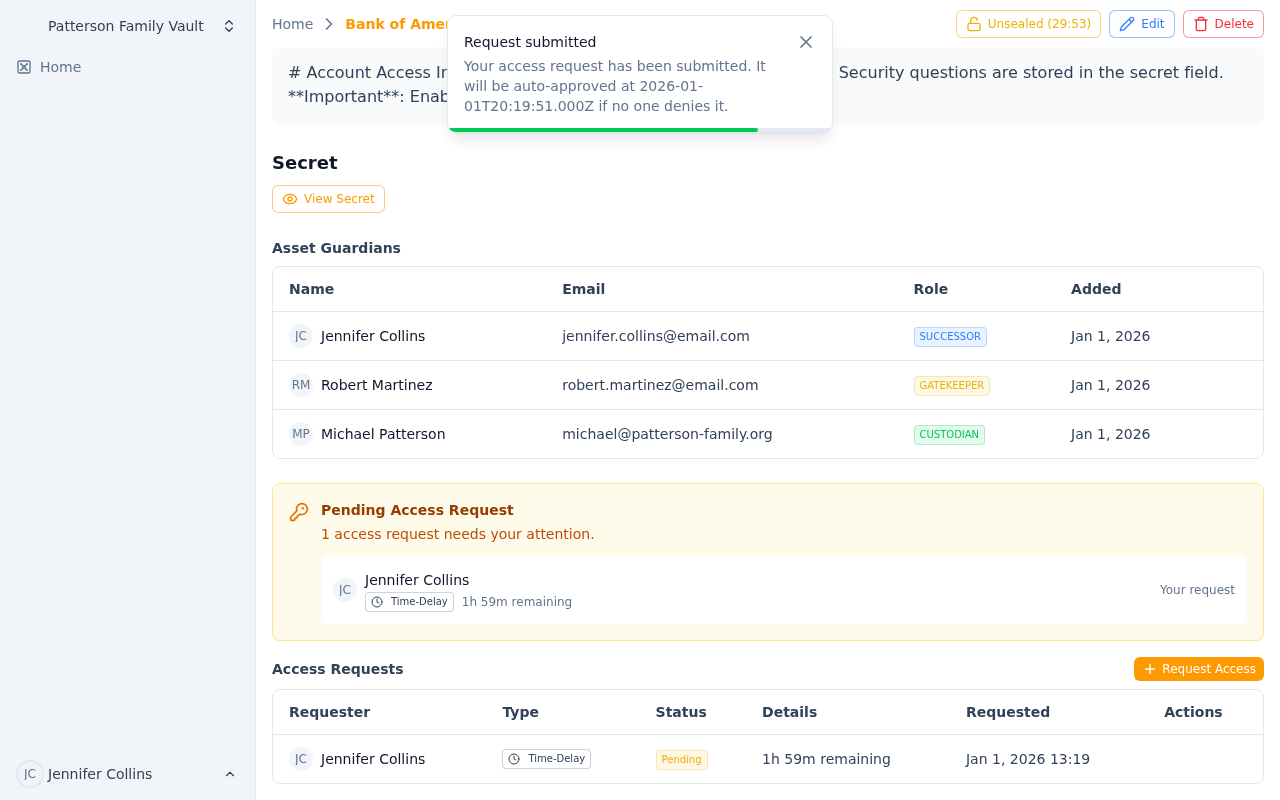 Complete visibility into all asset access, requests, and guardian changes
Dashboard View for Asset Owners:
Your Assets Overview
- Total assets you're custodian of
- Recent activity on your assets (last 7 days)
- Pending requests requiring attention
- Suspicious flags for your assets
Activity Timeline
- Chronological view of all events
- Filter by asset
- Click to see full details
- Export for records
Guardian Management
- See all guardians for your assets at a glance
- Quick add/remove guardians
- See pending requests per gatekeeper
- Identify gaps (assets without successors)
Quick Actions
- Approve/deny pending requests
- Revoke active access sessions
- Add/remove guardians
- View detailed asset audit trail
Bottom Line: Complete visibility means complete control. You're never in the dark about who's accessing your secrets. Every action documented, every custodian informed, every suspicious pattern flagged.
Your secrets. Your oversight. Your peace of mind.
Ready to Secure Your Business Continuity?
Get Started with Key Man Out | Schedule a Demo | View Pricing