
Key Rotation
Key Rotation
Change Your Keys Without Compromising Security
Even the strongest encryption benefits from periodic key rotation. Key Man Out provides enterprise-grade key rotation with multi-party approval—ensuring no single person can change your team's vault key phrase unilaterally.
Why Rotate Keys?
Personnel Changes
When team members leave your organization, they may still know your vault key phrase. Key rotation ensures departed employees lose access to your encrypted secrets immediately.
Compliance Requirements
Many security frameworks and industry regulations mandate periodic key rotation:
- SOC 2: Requires cryptographic key management policies
- HIPAA: Mandates access controls including key management
- PCI-DSS: Requires regular key rotation for cardholder data
- ISO 27001: Includes key management in information security controls
Security Hygiene
Regular key rotation is a defense-in-depth practice:
- Limits the window of exposure if a key is ever compromised
- Reduces risk from key material that may have been inadvertently shared
- Demonstrates proactive security posture to auditors and stakeholders
Suspected Compromise
If you suspect your vault key phrase may have been exposed—through phishing, social engineering, or any other means—immediate rotation limits potential damage.
How It Works
Step 1: Initiate Rotation
Any team owner or admin can initiate a key rotation from Team Settings > Security.
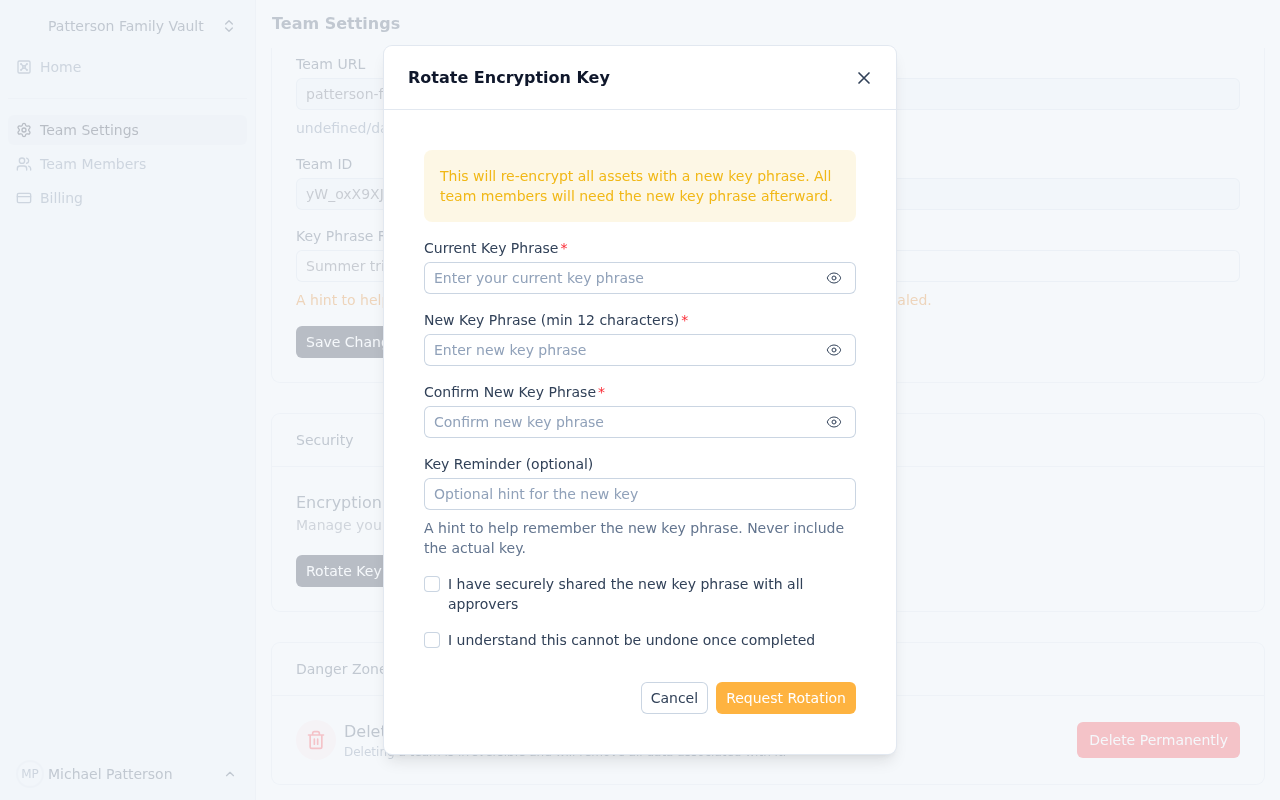 The key rotation initiation interface showing the current vault status
When initiating, you'll:
- Enter the current vault key phrase (to verify you have authority)
- Enter the new vault key phrase (twice, for confirmation)
- The system records a hash of your new vault key phrase
Step 2: Gather Approvals
For teams with multiple owners/admins, each must independently approve the rotation:
 Tracking approval status across team administrators
Each approver:
- Receives an email notification about the pending rotation
- Enters the new vault key phrase (they must know it—no hints provided)
- System verifies their hash matches the initiator's hash
- Approval is recorded
Security Note: The system never reveals the new vault key phrase. Approvers must communicate it through your organization's secure channels outside of Key Man Out.
Step 3: Execute Rotation
Once all approvals are collected (or immediately for single-owner teams):
- The initiator clicks "Execute Rotation"
- Encrypted secrets are downloaded to the browser (encrypted with old key)
- Each secret is decrypted with the old key
- Each secret is re-encrypted with the new key
- Re-encrypted secrets are uploaded atomically
 Real-time progress during key rotation execution
Step 4: Completion
After successful rotation:
- All team members must use the new vault key phrase to unseal the vault
- The old vault key phrase no longer works
- A 24-hour cooldown prevents immediate re-rotation
- Audit logs record the rotation event
Safety Features
Multi-Party Approval
For teams with multiple administrators:
- No single point of control: One person cannot change the vault key phrase alone
- Independent verification: Each approver enters the vault key phrase separately
- Hash matching: System ensures everyone agrees on the new vault key phrase
Cooldown Period
A 24-hour cooldown between rotations prevents:
- Abuse by compromised admin accounts
- Accidental rapid successive rotations
- Denial-of-service attacks on team access
Expiration
Pending rotations automatically expire after 48 hours:
- Prevents stale rotation requests from lingering
- Ensures approvers act in a timely manner
- Cleans up abandoned rotation attempts
Execution Timeout
In-progress rotations fail after 1 hour if not completed:
- Prevents stuck rotations from blocking future attempts
- Allows retry after transient failures
- Maintains system consistency
Cancellation
Any team owner/admin can cancel a pending rotation at any time:
- Useful if the new vault key phrase is forgotten before all approvals
- Allows recovery from communication failures
- Immediately frees the team to start a new rotation
Best Practices
Vault Key Phrase Distribution
Before initiating rotation, ensure all approvers know the new vault key phrase:
- Use secure, out-of-band communication (in-person, encrypted messaging)
- Never share the new vault key phrase through Key Man Out
- Consider using a secure password manager for coordination
Timing Considerations
Choose rotation timing carefully:
- Avoid peak business hours when vault access is critical
- Ensure all approvers are available within the 48-hour window
- Consider time zones for distributed teams
Verification
After rotation:
- Have each team member verify they can unseal with the new vault key phrase
- Spot-check a few secrets to confirm successful re-encryption
- Update any backup copies of your vault key phrase
Documentation
Maintain records (outside Key Man Out) of:
- When rotations occur
- Who participated in approvals
- Reason for rotation (compliance, personnel change, etc.)
Single-Owner Teams
For teams with only one owner/admin:
- Rotation executes immediately after initiation
- No approval phase required
- All other safety features still apply (cooldown, etc.)
During Rotation
While a rotation is pending or executing:
What Works
- Vault access with the current (old) vault key phrase
- Viewing and editing existing secrets
- Creating new secrets (encrypted with old key)
What to Avoid
- Creating many new secrets (they'll need re-encryption)
- Inviting new team members (coordinate vault key phrase sharing)
- Sharing assets externally (links may break)
Visibility
- A warning banner appears on the team dashboard
- All team members can see rotation status
- Approvers see their action items
Troubleshooting
"Approver key phrase doesn't match"
The approver entered a different vault key phrase than the initiator. Solutions:
- Verify the approver has the correct new vault key phrase
- Cancel and restart if the vault key phrase was miscommunicated
- Check for typos or copy-paste errors
"Rotation expired"
The 48-hour approval window elapsed. Solutions:
- Start a new rotation
- Ensure all approvers are available before initiating
- Consider asynchronous communication challenges
"Execution failed"
Re-encryption encountered an error. Solutions:
- Retry the execution (button available)
- Check browser connectivity
- Contact support if persistent
"Cooldown active"
A rotation completed within the last 24 hours. Solutions:
- Wait for cooldown to expire
- This is a safety feature, not a bug
Key rotation is a critical security practice. With Key Man Out's multi-party approval and atomic execution, you can rotate with confidence—knowing your assets remain secure throughout the process.